Figma to WordPress
Figma to WordPress Development
Convert Figma designs into WordPress websites that look intentional and remain editable. Delivery can use Elementor or theme templates—focused on spacing, typography, mobile breakpoints and practical editor handoff.
Figma to WordPress Services
Convert Figma designs into WordPress pages with Elementor or custom templates—responsive, editable and aligned to spacing and typography from the design file.
- Figma to WordPress page builds
- Figma to Elementor section systems
- Responsive breakpoint matching
- Reusable templates for editors
- Forms, CTAs and conversion structure
- QA against design intent
Technologies
- Figma
- WordPress
- Elementor
- HTML
- CSS
- JavaScript
Problems I solve
- • Designs that look good in Figma but break in builders
- • Desktop-only implementations
- • Editors who cannot safely update pages
- • Inconsistent spacing after handoff
Development process
Step 1
Design review
Confirm components, breakpoints and which pages are in scope.
Step 2
Build in WordPress
Implement layouts in Elementor or templates with reusable patterns.
Step 3
Compare & handoff
Responsive QA against Figma and editor guidance for your team.
Related work
Selected projects that demonstrate relevant capabilities. Full case notes are available where published.

Pinakin Design Studio
Modern AI-driven digital studio website with sleek cyber aesthetics, interactive dynamic timelines, smart chatbot integration and responsive lead capture.

Trinetix Consulting
Corporate consulting platform for an enterprise AI, cognitive architecture and digital engineering firm — featuring domain strategy pillars and quantified case studies.
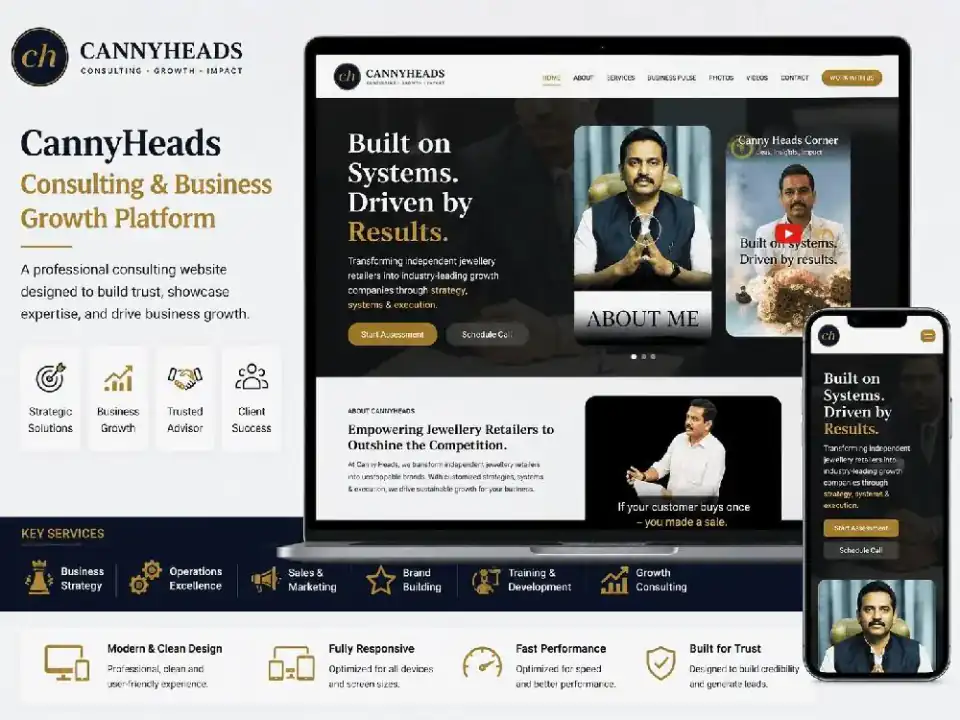
Canny Heads
Consulting group website for jewellery retail growth, training, software and related ventures — built for trust and lead generation.
Why work with me
You work directly with Pardeep Kaushik—a Full Stack, WordPress and Shopify developer based in India and available for remote projects worldwide. Communication stays clear, delivery stays owned end to end, and handoff includes the details your team needs to keep moving. After delivery, you own the project files and source code handed over unless otherwise agreed.
Frequently asked questions
Can you convert Figma to Elementor?
Yes. Figma-to-Elementor builds are a common WordPress delivery path when the client wants editable page-builder layouts.
Do you need developer access to Figma?
View or inspect access to the Figma file (or exported specs) is required to match spacing, type and components accurately.
Will the site be editable after launch?
Yes. The goal is a WordPress site your team can update—not a locked visual clone.
Start Your Project
Share your requirement for a free project estimate. Staging review and clear handoff are part of how engagements are delivered.